Total Care Team Clarity for Healthcare Communications, with One Unified Inbox for Every Channel.
Your patients are going to reach out and communicate in whatever way is most comfortable for them — not the channel you’ve designated, the one they prefer. That might be a text at 9 PM, an email Monday morning, or a call from a number shared by three family members. Your team has to be ready for everything.
For too long, “ready” has meant juggling disconnected systems that each do part of the job. Your scheduling tool fires reminders. Your EHR stores the chart. Your messaging platform handles texts. None of them talk to each other — and your patients feel it. They get pinged repeatedly from tools that don’t know what the others have already done. They develop what we call “visual fatigue”: Patients tune out the noise, miss critical follow-ups, and arrive at appointments more frustrated than informed.
Your clinicians feel it too. They’re on the front line — and they’re absorbing the frustration patients have with tools that don’t work together, on top of everything else they’re already managing. That’s not sustainable for your team or your patients.
The market has no shortage of tools that promise to fix this. Many of them are good at communication. Few of them know anything about your patient. And none of them were built to run a care program.
Welkin built the new Inbox to do more than unify your channels. It’s the command center for every patient conversation — built on top of your care plans, your workflows, and your team structure, so your staff can respond with the full picture every time.
Why Healthcare Communications Keeps Falling Short
The challenges driving this are ones your team probably recognizes:
- Your channels are fragmented. SMS, email, patient portal, phone, and live chat each operate in silos. There’s no single view of the full patient conversation — and every switch between tools is a chance for something to slip.
- Routing is manual. When an inbound message could be a billing question, a prescription refill, or a clinical concern, someone on your team has to figure out where it goes. That someone is usually the wrong person.
- Shared contacts create confusion. When multiple patients share the same phone number — common in pediatric and family care — every inbound message becomes a guessing game. Someone has to manually attribute it to the right patient every time.
- There’s no accountability for response time. Without SLA tracking built in, there’s no visibility into whether a message got handled — or how long it sat waiting.
- The automation is adding to the noise. When your scheduling tool, EHR, and billing platform each fire their own reminders independently, your patients start ignoring them all. That’s not just a patient experience problem. It’s a clinical risk.
Introducing Welkin’s Inbox
Welkin’s Inbox is a unified, role-aware communication hub built directly into the Welkin care management platform — not bolted on, not integrated after the fact. It was designed for healthcare organizations from the ground up, not adapted from a generic CRM or help-desk tool.
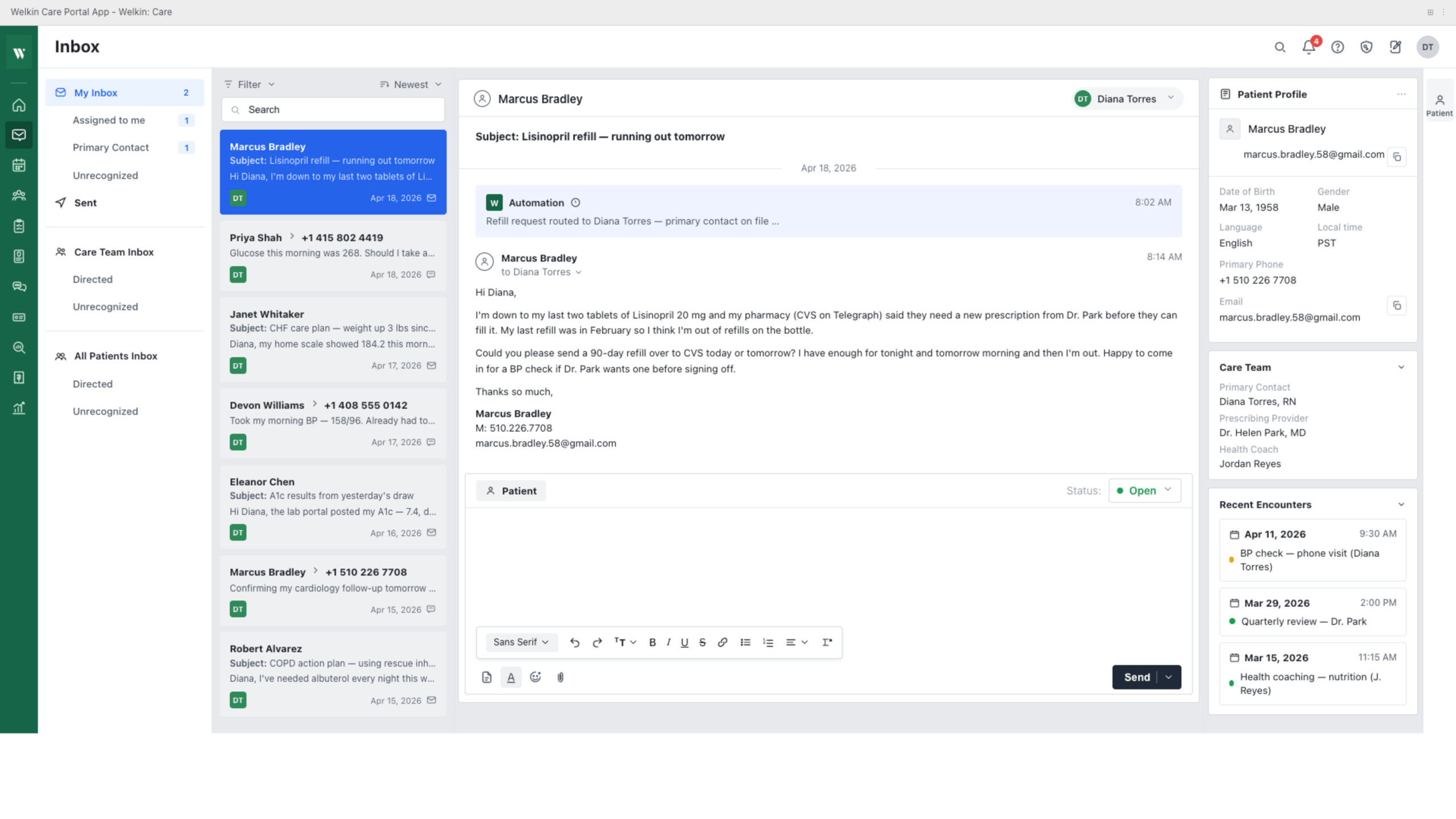
Every message is tied to a patient record. Every response is backed by clinical context. Your team members see exactly what they need to see, and nothing they don’t. Let’s look at what that means in practice.
What Makes the Welkin Inbox Different
1. Role-Based Views That Match How Your Team Actually Works
Your care coordinators, clinical staff, and administrators don’t work the same way — so why should they see the same inbox? Welkin surfaces three distinct views built around how your organization is structured:
- My Inbox: Your personal queue of messages assigned to or claimed by you — so you always know what’s yours to handle.
- Team Inbox: A shared view for your care team, enabling collaborative triage and smooth handoffs without messages getting lost.
- All Patients Inbox: An organization-wide lens for managers and administrators who need full visibility without wading through everything.
These aren’t cosmetic filters. They determine which messages appear, what context is shown, and who’s accountable for resolution. The result is a first-in, first-out queue model that surfaces your oldest unresolved conversations first — so nothing falls through the cracks because “someone else was going to get to it.”
2. Your Patient’s Full Context — Right Next to Every Message
Think about how many times your team switches tabs just to answer one message: check the patient record, pull up the care plan, look at the scheduling history, then come back to respond. That context-switching is one of the most expensive inefficiencies in clinical communication — in time, in errors, and in staff attention.
With Welkin’s Inbox, your patient’s care program status, recent encounters, active care plan, and key demographics are displayed in a dedicated panel right alongside every active conversation. Your staff can respond with full context — not guesses — without ever leaving the Inbox.
3. Smart Routing That Gets the Right Message to the Right Person
Not every inbound message belongs in the same queue. A payment question should reach billing. A prescription refill request should reach your clinical staff. And an appointment confirmation reply, in most cases, shouldn’t need to reach anyone at all.
Welkin’s Inbox handles this intelligently. You configure the routing rules; the platform does the work. Automation marks conversations as resolved when the content warrants it, so your team only sees what genuinely needs their attention. No more noise. No more triaging messages that belong to someone else.
And when response time matters — which in healthcare, it always does — Welkin’s SLA-driven queue management keeps your team accountable. Escalating urgency surfaces before a deadline is missed, not after.
4. Shared Contact Resolution — Built for Family and Pediatric Care
If your organization works with minors or family care models, you’ve likely dealt with this: two patients sharing the same phone number. Every inbound SMS from that number becomes a guessing game. Someone on your team has to manually attribute it to the right patient — every single time. For some organizations, that’s been a full-time job.
Welkin rethinks this entirely. Unrecognized communications are routed to a dedicated triage queue where they can be efficiently matched to the right patient and assigned to the right team member — reducing the manual burden and eliminating the risk of a message landing in the wrong patient’s record.
5. Search That Works the Way Your Team Thinks
When you need to find a specific conversation, you shouldn’t have to remember which patient it was filed under. Welkin’s Inbox lets your team search across your entire communication history by:
- Phone number — helpful when you know the number but not the name
- Email address — to/from, so nothing gets buried
- Patient or contact name
- Free text — search within the message content itself
For supervisors and quality teams, this is also a powerful audit tool. Pull communication records in seconds. Locate specific conversations without navigating individual patient files. The Inbox isn’t just where your team works — it’s a record of how your organization communicates.
6. Every Channel. One Platform. HIPAA-Compliant by Design.
Your patients communicate across SMS, email, chat, WhatsApp, Zoom, and phone. Your team needs to meet them there — without managing six different tools to do it. Welkin’s Inbox brings all of it together:
- SMS and MMS messaging
- Asynchronous secure email
- Web-based and patient-facing live chat
- WhatsApp messaging
- HIPAA-compliant video visits
- Phone call logging
And unlike third-party messaging tools that layer on compliance after the fact, Welkin is built HIPAA-compliant from the ground up. Every channel, every message, every attachment — handled within a framework designed for healthcare, not retrofitted for it.
